
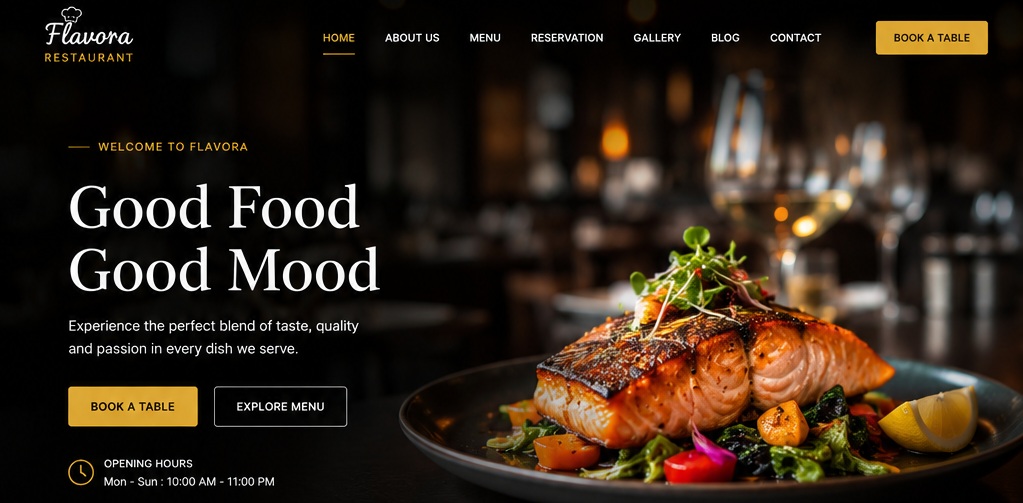
A restaurant’s website is like the digital storefront that shapes how customers see your brand before they choose your dishes. From the very first click, design choices influence visitors’ confidence in booking a table, ordering online, or planning a visit.
A clean, inviting, and user-friendly website builds trust, makes a strong first impression, and turns casual browsers into loyal diners. This article explores practical ideas and best practices to improve user experience and boost conversions.
A Quick Comparison: Poor vs Great Restaurant Website
| Factor | Poor Design | Great Design |
| Menu | PDF, outdated | Mobile-friendly, updated, with photos |
| Booking | Phone-only | One-click online reservations |
| Orders | Redirected to third-party | Integrated direct ordering |
| Atmosphere | Generic stock images | Real photos reflecting the brand |
| SEO | Low visibility | Optimized for local searches |
| Trust | Missing reviews | Testimonials, awards, certifications |
Idea #01: Use High-Quality Food Photography
Humans eat with their eyes first. Professional images stimulate appetite and help customers visualize the dining experience.
- Signature dishes: Showcase your best-selling or most unique plates with mouthwatering close-ups.
- Interior and ambiance: Highlight the atmosphere (cozy, elegant, or vibrant) to set expectations.
- Chef or team photos: Personal touches build authenticity and trust.
- Consistent visual style: Stick to a color palette and editing style to reinforce brand identity.
- Optimized image sizes: Compress files to maintain fast load speeds without sacrificing quality.
Idea #02: Create a Clear and Easy-to-Read Menu
The menu is the most visited page on a restaurant’s site. Readability beats flashy design every time.
- Organized categories: Separate starters, mains, desserts, and drinks for easy scanning.
- Descriptions for key dishes: Brief, appetizing descriptions help customers make quick decisions.
- Pricing transparency: Avoid hidden costs; clear pricing builds trust.
- Mobile-friendly layout: Over 70% of restaurant searches occur on mobile devices, so menus must adapt seamlessly.
- Downloadable/searchable options: Useful for corporate clients or regulars who want quick access.
Idea #03: Make Reservations Simple
Customers should be able to book a table in seconds.
- Prominent reservation button: Place it in the header or homepage hero section.
- Online booking integration: Tools like OpenTable or Resy streamline the process.
- Confirmation messages: Provide instant reassurance that the booking is secured.
- Mobile-friendly booking: Ensure forms are short and optimized for touchscreens.
Idea #04: Highlight Your Restaurant’s Story
Storytelling creates emotional connections that drive loyalty.
- Restaurant history: Share how it started – family-owned, heritage-inspired, or innovative concept.
- Mission and values: Sustainability, community focus, or culinary innovation.
- Chef’s background: Highlight expertise and passion.
- Local ingredients: Emphasize freshness and support for local farmers.
- Unique dining experience: Showcase what sets you apart – live music, themed nights, or signature rituals.
Idea #05: Display Essential Information Clearly
Customers shouldn’t have to dig for basic details. If they can’t find your address or hours quickly, they’ll move on to competitors.
- Address and opening hours: Place them prominently in the header, footer, or contact page.
- Phone number and email: Use click-to-call and click-to-email links for instant access.
- Parking details: Especially important for suburban or destination restaurants.
- Location map: Embed Google Maps for easy navigation.
Idea #06: Optimize for Mobile Users
Over 70% of restaurant searches happen on mobile devices, often while customers are on the go.
- Responsive design: Layouts should adapt seamlessly to different screen sizes.
- Fast loading: A one-second delay can reduce conversions by 20%.
- Easy navigation: Large buttons, simple menus, and intuitive flow.
- Click-to-call buttons: Essential for mobile users wanting quick reservations.
- Mobile-friendly menus and reservations: Avoid PDFs; use interactive, scrollable formats.
Idea #07: Showcase Customer Reviews and Testimonials
Social proof builds trust and influences decisions.
- Customer testimonials: Highlight positive experiences.
- Ratings: Display Google, Yelp, or TripAdvisor scores.
- Media mentions: Share press coverage or food blog features.
- Awards: Showcase recognitions like “Best Brunch Spot” or “Top 10 in City.”
- User-generated content: Encourage diners to share photos on Instagram and feature them on your site.
Idea #08: Include Online Ordering (If Applicable)
With takeaway and delivery booming, online ordering is a lifeline for revenue.
- Clear ordering process: Simple steps from menu to checkout.
- Delivery options: Highlight partnerships with delivery apps or in-house service.
- Pickup information: Provide clear instructions for curbside or in-store pickup.
- Menu synchronization: Keep online menus up to date with real-time availability.
- Secure payment methods: Offer trusted gateways like Stripe, PayPal, or Apple Pay.
Idea #09: Use Strong Calls-to-Action (CTAs)
CTAs guide visitors toward the actions that drive business success. Without clear prompts, customers may browse but never commit.
- Some examples: ‘Reserve a Table’, ‘Order Online’, ‘View the Menu’, ‘Call Now’, ‘Contact Us’, etc.
- Strategic placement: CTAs should appear on the homepage hero section, in the navigation bar, and at the end of key pages.
- Design tip: Use contrasting colors and action-oriented language (“Book Now” vs. “Submit”).
Idea #10: Maintain Consistent Branding
Cohesive branding strengthens recognition and builds trust. Inconsistent visuals confuse customers and dilute brand identity.
- Brand colors: Use the same palette across the site, menus, and signage.
- Typography: Stick to 2–3 fonts that reflect your brand personality.
- Logo placement: Prominently displayed in the header and footer.
- Photography style: Consistent lighting and editing reinforce brand tone.
- Messaging: Align copywriting with your restaurant’s voice (casual, elegant, or playful).
Idea #11: Improve Website Speed and Performance
Even the most beautiful website fails if it loads slowly. Customers expect instant access.
- Image optimization: Compress photos without losing quality.
- Reliable hosting: Choose providers with strong uptime guarantees.
- Minimal unnecessary animations: Keep design sleek and functional.
- Efficient coding: Use clean code and minimize plugins.
- Performance testing: Tools like Google PageSpeed Insights help identify bottlenecks.
Idea #12: Add Social Media and Event Integration
Fresh content keeps visitors engaged and encourages repeat visits.
- Social media links: Connect Instagram, Facebook, TikTok, or Twitter.
- Event announcements: Promote live music, wine tastings, or seasonal specials.
- Seasonal menus: Update regularly to reflect new offerings.
- Promotions: Highlight discounts, happy hours, or loyalty programs.
- Gallery updates: Showcase customer photos or behind-the-scenes shots.
- Newsletter signup: Build a mailing list for ongoing engagement.
Tips for Creating an Effective Restaurant Website
A restaurant’s website should balance aesthetics, usability, and business goals. It’s about guiding visitors smoothly from browsing to booking or ordering while looking as delicious as your dishes.
Focus on User Experience Before Visual Effects
Prioritize ease of use over flashy animations. Customers want quick access to menus, reservations, and contact details. Overly complex designs can slow down navigation and frustrate users.
Keep Navigation Simple
Use clear, intuitive menus with logical categories. Limit the number of top-level options to avoid overwhelming visitors. Place key CTAs (Reserve, Order Online) prominently.
Regularly Update Menus and Promotions
Outdated menus or expired promotions erode trust. Sync online menus with in-house offerings to avoid customer disappointment. Highlight seasonal specials or limited-time offers to create urgency.
Test on Multiple Devices
Ensure the site works seamlessly on desktops, tablets, and smartphones. Test across browsers (Chrome, Safari, Edge) to avoid compatibility issues.
Use Professional Photography
Invest in high-quality images of food, interiors, and staff. Avoid stock photos as they reduce authenticity. Optimize images for fast loading without losing quality.
Monitor Website Analytics
Use tools like Google Analytics to track visitor behavior. Identify which pages drive bookings or where users drop off. Adjust design and content based on real data.
Gather Customer Feedback for Improvement
Add quick surveys or feedback forms. Encourage reviews and testimonials to understand customer expectations. Use insights to refine design, content, and functionality.
A restaurant website should do more than exist. In fact, it should inspire confidence, showcase the dining experience, and make it effortless for customers to act. From the moment a visitor lands on your site, every detail matters. Most importantly, restaurant owners should view their websites as an ongoing marketing tool.
Contact Tectera who offers website design in Sri Lanka to get more restaurant website design ideas.

