
sales@tectera.com
+1 (647) 871 9554)

Tectera

BLOG

Bring your
web ideas to life

If you belong to a health care company and want to build an eminent position in the health care industry then having a professional and functional website is a must. A hospital website should have all the necessary information clearly mentioned to inform the patients about their credibility and medical services.

It should have the satisfying patient’s reviews to gain trust and allow more people to avail their medical services. From the location of the hospital to the hours of operation, list of doctors and staff on board all such relevant information should be added to the website to make sure patients find all answers to their queries. Here are ten amazing hospital website design ideas to take inspiration from;

Hospital Website Design Idea 1

Hospital

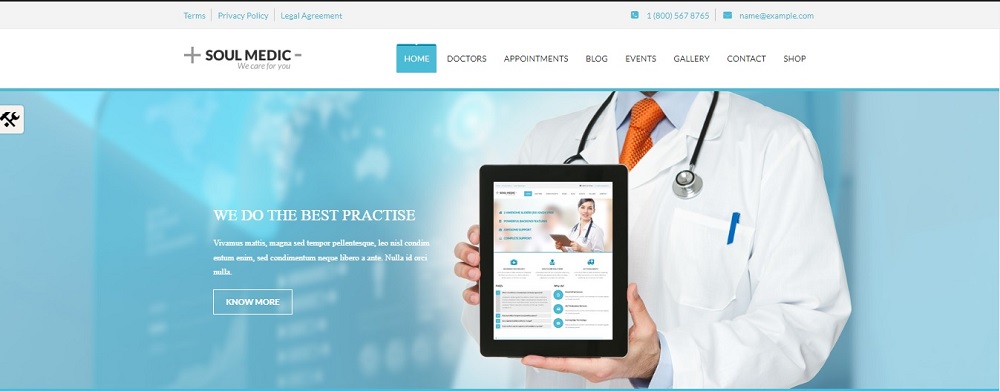
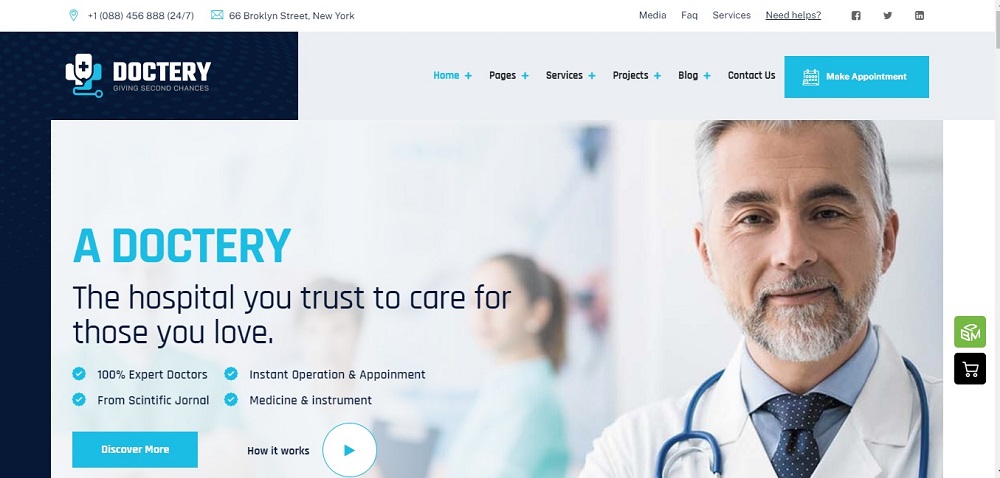
This seems like an amazing idea; the highlight of the homepage is the hospital’s mission statement to gain patients trust and prove their credibility. The website includes the list of doctors who serve at the hospital along with their qualification and area of specialty. It also includes appointment section to help patient book an appointment. Along with this, it also includes the events and seminars organized by the hospital.

The contact number and email address of the hospital has been provided to get in touch with the patients and answer their queries. Additionally, terms and condition along with privacy policy of the hospital has also been added to the website for further clarity. In a nutshell, the website includes all the necessary information that a patient might seek for.

Hospital Website Design Idea 2

Hospital

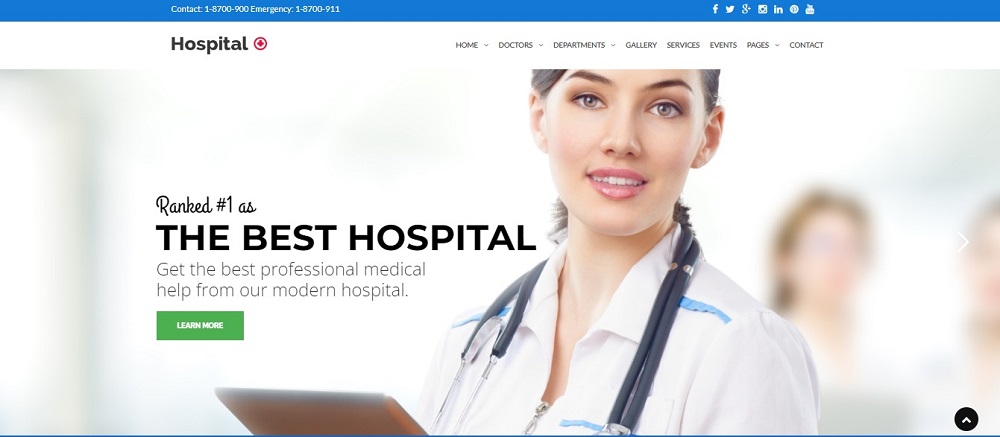
This is another great website design idea where the hospital has taken the opportunity to show its credibility by mentioning itself as one of the best hospitals. Such taglines seem to attract more patients and gain their trust. The website also includes the list of doctors and staff on board and the departments they have.

The website includes a separate section of services to inform the patients about the medical services they offer. The contact details along with emergency number has been mentioned to get in touch with the patients. Social media handles are also added to boost the marketing of the healthcare company.

Hospital Website Design Idea 3

Hospital

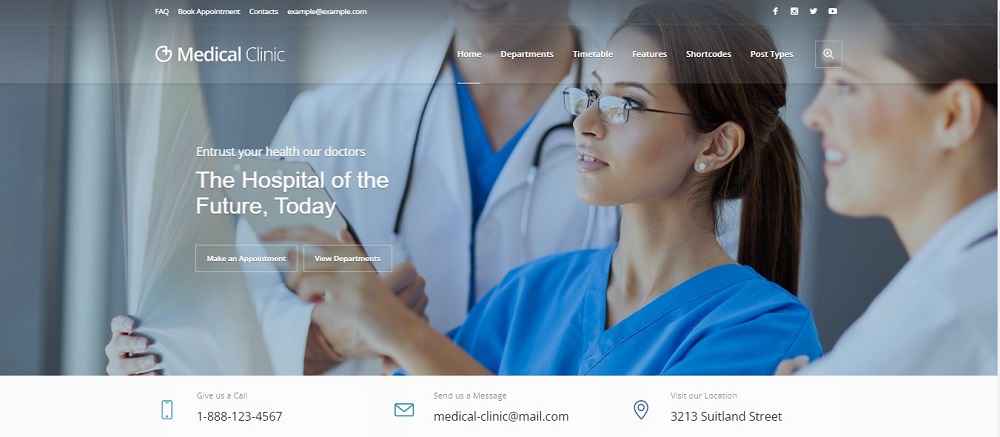
This is a very engaging website design idea where not only the mission statement of the hospital gathers viewer attention but the option to book appointment and view department has been added separately for further clarity. Along with this, the contact number, email address and the location of the hospital has also been mentioned to allow clients have a in person survey of the hospital.

The website also includes the department and features of the hospital along with frequently asked questions and social media handles for marketing purpose.

Hospital Website Design Idea 4

Hospital

This is another engaging website design idea incorporating all the features and information of a professional hospital website. The website shows the distinct features of the hospital as the highlight of the homepage to show their credibility in the health care industry. The option to book appointment is made clear.

The website also includes the contact number and location of the hospital along with their services and frequently asked questions. The outlook of the website is intellectual and attention seeking and contains all the necessary information and answers the viewers might look for.

Hospital Website Design Idea 5

Hospital

This is a minimalistic approach-based website design where only precise information is shared on the homepage to avoid it being too crowded. The website includes information about the health care company along with the services they offer. The option to contact has separately been provided to get in touch with clients and answer their queries. The option to book appointment is also made clear and highlighted. This seems a simple design covering all the necessary aspects of a professional hospital website.

Hospital Website Design Idea 6

Hospital

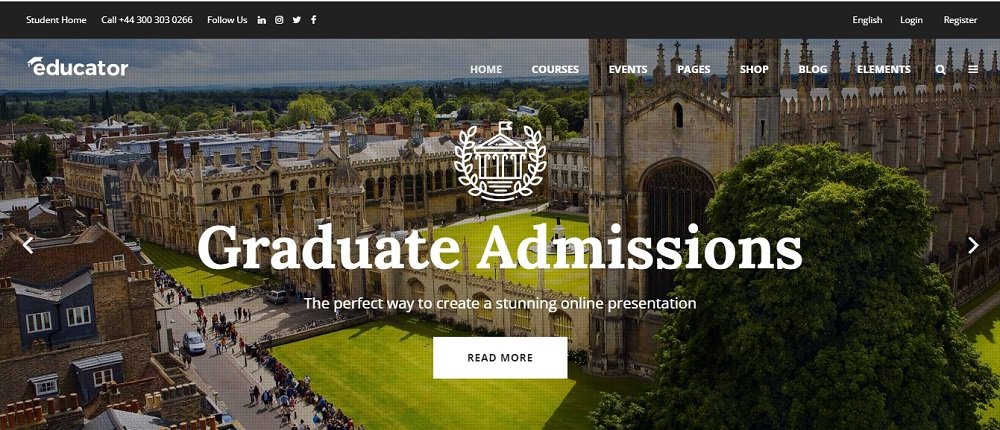
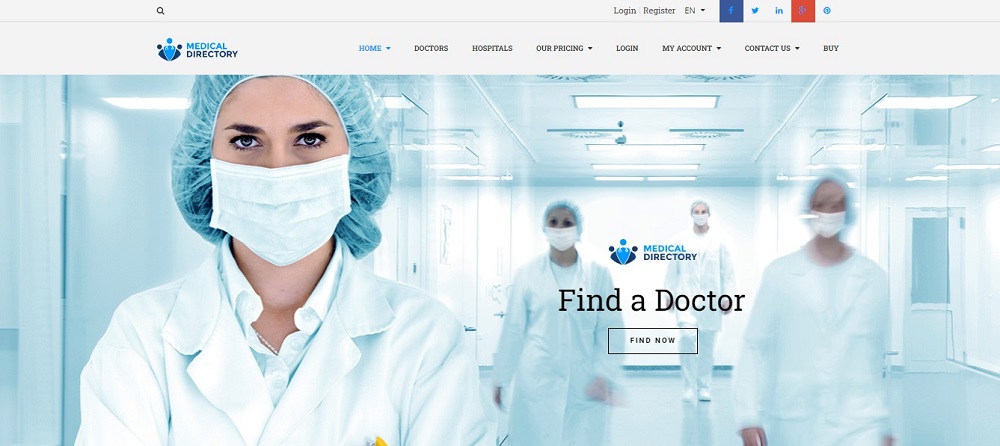
This seems like a sophisticated and thoughtfully designed website outlook. The homepage of the website is kept simple to avoid unnecessary information and make it appear functional and professional. The website includes the list of doctors on board along with the hospitals and their locations.

The website also allows the user to create an account on the website to avail services and notifications about the upcoming services and events happening in the hospital. The website is available in different languages to cater more people and increase accessibility. The social media platforms are also shared for marketing purpose.

Hospital Website Design Idea 7

Hospital

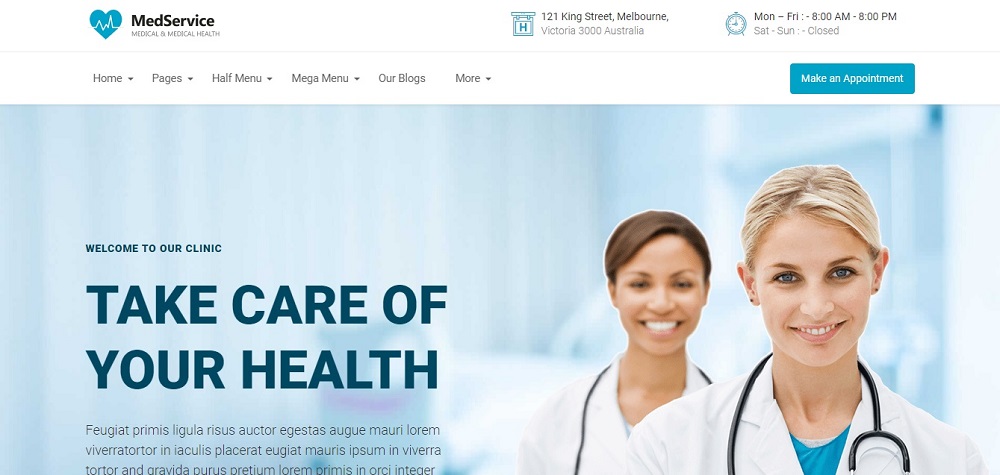
Just like all other website designs this design is also based on a blue and white theme. The homepage includes the mission statement of the hospital with a perfect background picture to add more value to the outlook of the website. The website includes the services of the hospital along with their timetable and the option to contact. The emergency call number has also been shared along with their email address for people who want to avail online consultation services.

Hospital Website Design Idea 8

Hospital

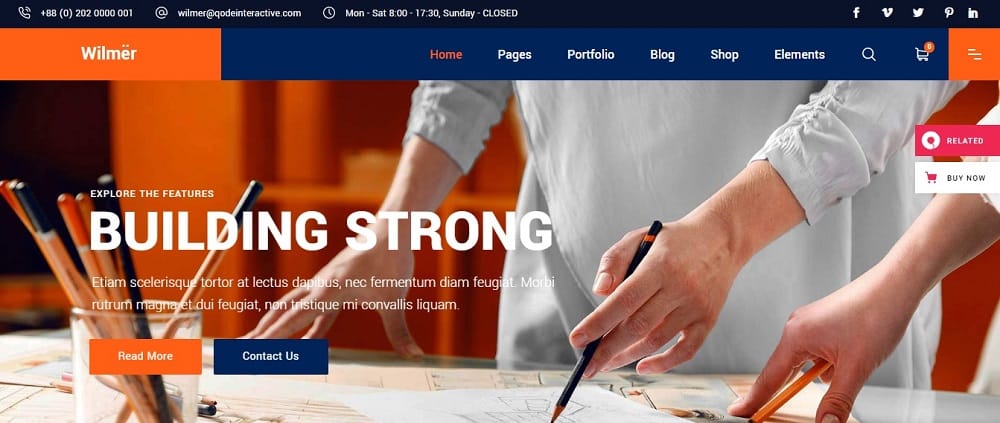
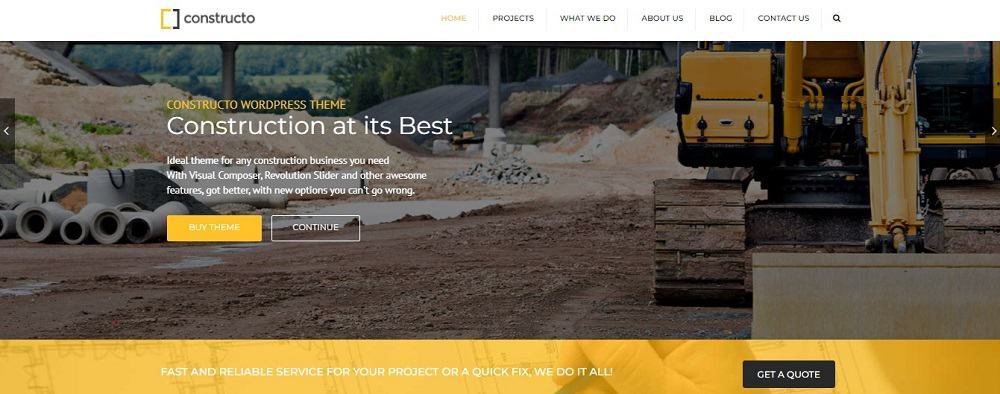
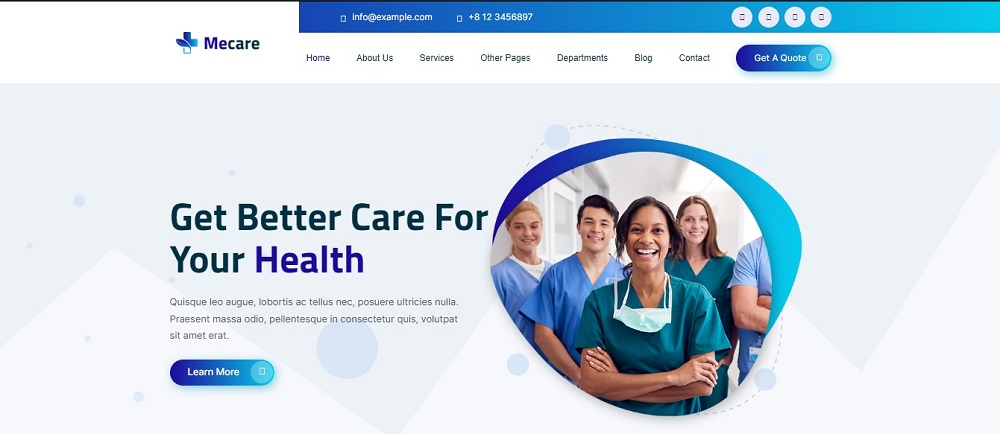
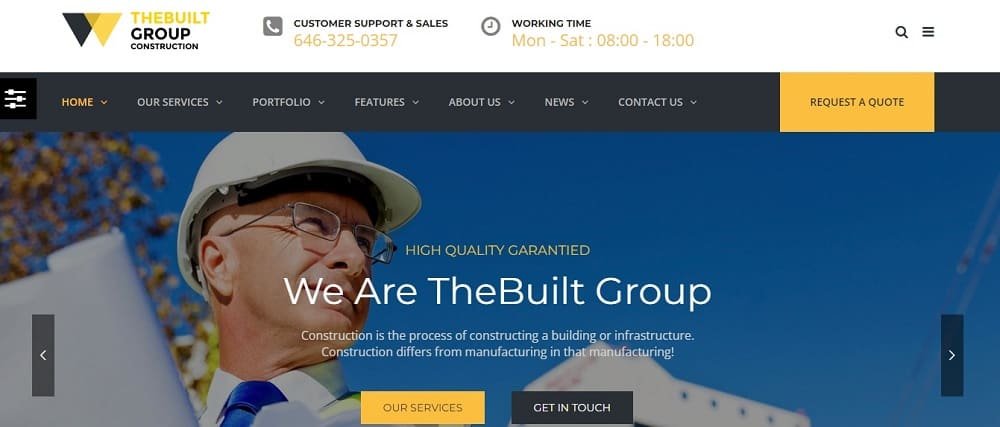
The outlook of this website is aesthetically appealing and inspiring, the highlight of the homepage is the mission statement of the hospital. The website includes their services, departments and the option to contact. The option to get a quote is highlighted to make it clear and visible. The contact number and email address have also been shared to get in touch with the clients.

Hospital Website Design Idea 9

Hospital

This is a perfect website design incorporating all the relevant information regarding the hospital from their mission statement to their address and their operating hours, all things have been mentioned clearly to avoid any sort of confusion for the patient. The option to make appointment is highlighted to allow people to avail their medical services.

Hospital Website Design Idea 10

Hospital

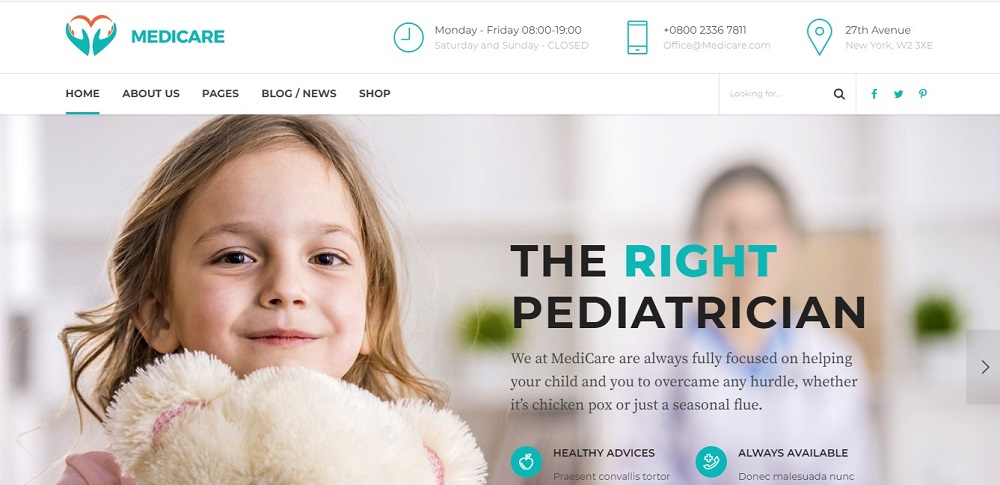
This seems an amazing idea including the mission statement of the hospital along with their services and their specialty. The website includes the search option to help the user navigate through the page. It also includes their operating hours, contact number, email address and their location for further clarity. The outlook of the website is kept simple but it contains all the necessary elements of a professional website.

Contact Tectera a leading web designers in Toronto to get more hospital website design ideas.

Social Share or Summarize with AI

Toronto is an ideal place for any business idea to succeed. The city’s active business environment, large population, and perfect location offer many advantages for business owners.

One key benefit of starting a business in Toronto is the availability of a well-educated and skilled workforce. The city’s diverse and multilingual population ensures access to a talented labor pool.

Furthermore, Toronto’s excellent transportation network and connectivity play a pivotal role in business success. Toronto is the central city of Ontario and is easily accessible by road, train, air, and sea. This ensures that raw materials and finished goods can move quickly. This guide will assist you in learning how to start a business in Toronto and achieve success.

1. Do market research

You should look into a few things before starting your business in Toronto. Before starting your business in Toronto, you should learn as much as possible about your rivals and the people you want to sell to. Here’s what you need to do:

Determine who your best clients are:Consider who would purchase your goods or make use of your services. Given the diversity of Toronto’s population, you must identify your target audience. To achieve this, you must know their age, interests, and shopping habits.

Examine other companies:Observe the other Toronto-based companies that fulfill your requests. You can see how you can become better and what kind of folks you’ll be competing against.

Keep up with the latest:Toronto is a significant city for new ideas and technology. So, be aware of any updates in your industry. This way, you’ll get great ideas and become well-known in your area.

Understand What People Like and Don’t Like:You can understand what people like and don’t like by talking to or asking them. The things you read will help you choose what to sell and how to market it.

Remember that you will do this study more than once. When your business grows, you should do this. Your business can do well in Toronto if you know what’s going on in the world and what people want.

Suggested Read: How to Start an E-Commerce Business in Canada

2. Create a business plan

If you already have a good business plan, these steps will help your company do well in Toronto. The following things need to be in your project about how to start a business in Toronto:

Company idea and goals:Explain your business idea and why you want to start it. Your company should have a clear mission statement outlining what makes it unique, just as you should have one for your travels.

Best description of products:People are curious about what your company offers or sells. Make them awareof the fantastic items you will bring on your journey. Describe the best features of your offerings.

Plan your finances and your objectives:You should plan your business just as you would a vacation. These are your goals, such as your desired income. Make a budget for how much you will earn and spend. This aids in the planning of your company’s revenue generation.

How your company operates:Describe your company’s daily operations. It’s similar to narrating travel tales. Which equipment and tools will you be using? How will you get the things you require? How are you going to manufacture your products or manage your company?

A well-structured business plan may assist you in understanding your company and demonstrate to potential lenders or investors in Toronto what your venture is all about. It’s similar to having a strategy that communicates to everyone how much fun your company is having. Remember to create a strong business strategy if you want to succeed!

3. Create a marketing plan

Telling people about your new business is similar to marketing. You need a strategy to succeed in Toronto since there are a wide variety of individuals who live there. Think about these:

  • This is similar to naming your vacation and discussing its unique features. You need a name and a system that works for everyone since Toronto is home to people from all over the globe. Consider ways to pique people’s interest in your company.
  • Make sure you are selling your company in the proper manner. There are several methods to advertise your company in Toronto. You may utilize the online, such as social networks, or distribute fliers and post signs about the social media pages of the people you want to do business with. You can contact them through social media and the internet if they spend a lot of time online.
  • Third, figure out how much your award is worth. This is analogous to the pricing setting stage. Find out how much the same items cost at different Toronto locations. Establish a reasonable pricing for your company and demonstrate its value.
  • These act as an invitation to everybody to join you on your journey. Create entertaining strategies to promote your company. To meet individuals in your community, you might attend events and collaborate with the local media. You may also invite well-known individuals to speak about your company. Now more people will be aware of your company.

You may use a marketing strategy to inform people about the status of your company. It’s like encouraging more people to join the fun when applying a reward system in your company.

4. Choose the Best Name for Your Company

It is legally required that you choose a suitable name for your company. The name you decide on will influence how customers see your company. Take into consideration the following factors while naming your company:

  • The name of your company should be distinctive. In Toronto, you want things to be different. Individuals shouldn’t mistake their business for another’s.
  • In the modern corporate world, having an online presence is crucial. Check to see if the domain name that goes with your business name is already taken. This is called a domain name. A lot of people look for information and things to buy online, so this can help people find you there.
  • Third, you need to file the name of your business with the government to stay out of trouble with the law. By taking these actions, you may legally safeguard your company name and prevent others from using it.

It’s essential to ensure it’s accurate, appropriately listed and fits the bill because it’s one of the first things people will notice about your business.

5. Register Your business

Like, if you pick the best tool for the job, you can choose the best business structure for your company in Canada. You need to make a big decision that will affect how you do your job and how your company works. For you to start your business, you need to do the following:

Picking out the right decision:It is necessary tomake decisions about the law. What kind of official organization do you want for your business? This will be different depending on your goals, the tax system you prefer, and how jobs are assigned. You can make an LLC, a corporation, your own business, be the sole owner of your business, or form a partnership with other people in Canada. Each one has its own rules and benefits.

Register your company.This is the same thing as going public with your business. The government needs to know about your business. It’s important to talk to the correct part of the government, like the CRA or the Ontario government. That way, people will trust your business and know you are a business owner.

Business permits and fees:These are the bar numbers for your business. You’ll need a company name and an HST or GST account to pay your taxes, no matter what you sell. For tax and other government reasons, these numbers work like secret codes.

After you finish these steps, your business will be known to the public and follow all laws. For instance, ensuring your business follows morals and helps others is similar.

6. Get a license

In Toronto, having a business is like playing games for fun. It would help to have the right books and licenses to follow the rules. What you should do is this:

For the type of business you run, you must find out what licenses and permits you need. You may want different kinds of rights from time to time. Some examples are permissions for your business, the environment, or health and safety.

Make sure you have the correct permissions. Getting the proper permissions for your business is like ensuring you have the right tools for the job. It will be easy for you to run your business.

Description Source
1. Check the zoning requirements Visit the Toronto Building Customer Service counter or use the Zoning By-law Interactive Map.
2. Choose a business name and register it Use the Business Name Search service and register with Service Ontario. Receive Master Business License.
3. Apply for a business license online Fill out the online application form, upload the required documents, and receive an email confirmation.
4. Pay the license fee and get your license Pay the fee online, receive your business license by email, and display it at your business location.

Getting the proper licenses and permissions is a lot like following the rules. Just like in your favorite sport, it’s essential to follow the law in Toronto so that your business can run legally and without problems.

7. Find Investors

If your business needs more money than you have saved, you may look for other ways to get the money. In Toronto, there are several ways to make extra cash, such as:

Make a business plan or pitch that people want to read: This is like giving your company an exciting history. Show how your business can grow and make money in a business plan or pitch. Make it so appealing that people will want to invest in your industry.

Look for investors: Some people and groups want to give money to new businesses. People like these are called innovators and angel givers. It’s like asking your game friends for help. These people can help you get the money your business needs to grow. You could also check out websites that help people get money for their companies. Several people may give you small amounts of money.

Many people in Toronto are always looking for new businesses to invest in. This is why the city is fun to visit, like having a group of people who want your business to do well.

8. Look for Office Space

Picking the right place for your business could have a significant effect. Before you choose an office space in Toronto, think about these things:

Easy to Access: Ensure all players can quickly get to your game. The office should be simple for both your staff and your clients to get to. People should be able to easily walk, drive, or take the bus to get there.

Proper Placement: All the things needed for the game should be in one place. This also goes for where you work. It needs to be close to both your partners and major transportation centers. It’s now easier to get what you need and give others what they want.

Third, price: Think of it as looking around for the best deals on video game equipment. You want to know how much it costs to rent or hire an office. Make sure the prices are fair for your business.

Once you’ve found the perfect office space, you must discuss the lease terms. Making the rules for the game is a lot like this. After that, you have to sign a deal to hire people that is good for both you and your business.

9. Hire the Best Talent

To run a great business, you need dedicated, skilled workers. Here are the steps you need to take:

Step Description
Write job descriptions Clearly outline the roles and responsibilities for the essential positions your company needs to fill.
Post job openings Advertise your job openings in various places, including online job boards and local trade shows.
Ensure compliance with labor laws Make certain that you follow all of Toronto’s labor laws and regulations, which encompass minimum wage and work hours.
Tap into the educated workforce Influence Toronto’s well-educated population by exploring potential talent from local universities and schools.

10. Promote and Grow Your Business

Launch your business and sell it now that everything is set up:You should start selling your things in Toronto. You can connect with the people you want to reach by sticking to your marketing plan. Review your marketing plans often and make changes as needed.

Remember that businesses need time to grow. There is a lot of competition in Toronto, so you need to be able to wait and adapt. Be ready to change based on what your clients need and want all the time.

Conclusion

Ultimately, how to start a business in Toronto is an exciting journey of challenges and chances. This book tells you everything you need to know to start your own business, from making a business plan to getting the money, permits, and licenses you need.

Know that the diverse market in Toronto offers unique chances. If you plan carefully, your business may do very well. You must be with the right people at the right time and place to do well. You can make your valuable company in Toronto’s growing business community if you work, are bright, and have a good plan. I hope your trip to Toronto for work goes well! Enjoy yourself, and remember what you want to achieve.

To develop a website for your business in Toronto contact Tectera the best web development company in Toronto.
Social Share or Summarize with AI

Do you want to know how to start a food blog but need help knowing where to begin? I know how annoying it is to deal with tech issues when all you want to do is share your delicious recipes. These tips can help you with the technical parts of starting a food blog or making an existing one even better.

You need to be creative and know how to start a food blog technically. You will learn how to make a website that is easy for people to use, how to take great pictures of food, and how to get search engines to notice your blog. All of these important things will be easy to understand in this book. When you’re done reading, you’ll feel sure you can start your food blog. Let’s get cooking and write your food blog with skill and love!

1. Generate ideas for your food blog

When thinking of ideas for your food blog, you must pick something you enjoy. First, decide whether to create recipes or write about restaurants you visit. Once you’ve made that choice, consider what kind of food you want your blog to focus on.

It can be comfort food recipes, yummy baked treats, or healthy restaurants. This way, your blog will be more interesting to your readers and show your passion for food.

2. Choose a Blog Name

First, you need to choose a catchy name for your food blog. What is your blog about? This name is like a label that stands out. So make a smart choice!

It might take a while to pick a name. You should first think about what you will write on your blog. Are you going to give out recipes? If so, what kinds of foods do you like the most? You can also talk about healthy eating and suggest great places to eat. Make sure you know what your blog will be about before you choose a name.

You can think of many names for your blog that fit what it’s about. You can even be artistic and use cool or funny words that fit. You can use a blog name generator to help you develop some cool names if you need help.

3. Choose Blogging Platform

After you start a blog, the next important step is to find a good writing tool and a reliable web host. You don’t know how to use technology to do this. There are many easy-to-use tools out there that can help you make a website for your blog. These tools have professional features that make the process open to everyone.

When picking, you should consider important things like customer service, stability, and speed. With options like Wix, you can conveniently purchase a domain and create a free blog all in one place, making it a simple and effective way to bring your food blog to life.

To provide your readers with a good experience on your blog, the uptime of your site is essential. You will need more than 99% to keep your readers coming back to your content repeatedly.

The Ideal Blog Name: Why It Matters

Characteristic Benefits
Descriptive Clearly communicates your blog’s focus.
Memorable Easier for readers to recall and revisit.
Short Simple, to the point, and less prone to typos.

4. Register the Domain

Check Domain Availability:Go to the website of a domain provider, like GoDaddy, Namecheap, or Google Domains, to see if the domain name you want is free. Just type the domain name you want to use into the search bar on the registrar’s website.

Choose a domain extension:Pick a domain extension (like.com, .net, or.org) that fits the goal and reach of your blog. Even though it is popular, you can look into other choices as well.

Register the Domain:You can proceed with registering if the domain name you want is available. Follow the registrar’s directions, giving them your contact information and the money they need.

Privacy Protection (Optional): Some registrars offer privacy protection services, known as WHOIS privacy, which hides your personal information from the public database. It’s optional but can enhance privacy for an additional fee.

Confirm the Purchase: Check your order to ensure its correct, then pay for it. After the payment goes through, the domain will be registered in your name.

Maintain Your Domain: Once you’ve registered your domain, you’ll use the registrar’s control page to take care of it. Here is where you can change DNS settings, refresh the name, and make changes for the future.

Set Up Web Hosting: To launch your food blog, you’ll also need web hosting. Many registrars offer hosting services, or you can select a separate hosting provider. Connect your domain to your hosting account by adjusting the domain’s DNS settings.

These simplified steps should help you in the domain registration process for your food blog.

5. Buy a Web Hosting

Securing a Domain Name is the initial step. The next crucial phase involves finding a suitable web hosting service. Web hosting entails obtaining online space where your audience can access your website and consume your content.

A web host stores all files for your website or blog. There are many web hosts, such as HostGator, GoDaddy, Bluehost, Namecheap, and many more. Some of these companies may give free name registration for the first year as part of their hosting plans, which is something you should keep in mind.

Web Hosting Provider Shared Hosting Plan Price Range (Per Month)
Bluehost $2.95 – $13.95
HostGator $2.75 – $5.95
SiteGround $6.99 – $14.99
A2 Hosting $2.99 – $14.99
InMotion Hosting $6.99 – $12.99
Hostinger $1.39 – $3.99
DreamHost $2.59 – $4.95
WP Engine $25 – $290 (Specialized WordPress hosting)

6. Pick a design for your blog

The design of your food blog is very important, and it should fit your wants and your brand’s image. There are two main choices you can make: pick one of the ready-made blog themes or start from scratch and make your design. The key here is to ensure that every aspect of your blog contributes to attracting your distinct brand identity by employing consistent visual language.

Here are some essential considerations for blog design:

Template vs. Custom Design: You have two options to choose from: Either select a pre-designed template or create a custom design.

Visual Consistency: Ensure every element aligns with your brand identity for a cohesive look and feel.

Typography and Color: Utilize various fonts and color schemes to convey the right tone and message.

Tips for Choosing a WordPress Theme

  • Your theme should match your beautiful preferences and provide the desired features.
  • It’s essential that the theme is crafted by experienced professionals to guarantee quality.
  • Ensures an ideal viewing experience on various devices (computers, phones, tablets).
  • Content should be easily readable without the need for manual zooming.
  • Well-designed websites typically achieve higher rankings in search results.
  • Avoid themes with coding errors; utilize the W3C’s markup validation service to identify and rectify errors, as fewer errors contribute to improved search rankings.
  • Pick a theme with integrated design options.
  • Having access to responsive support teams and community media is vital for resolving technical issues.
  • A theme supported by exceptional resources ensures a smoother operation of your website.

7. Create a Logo

Creating a unique logo is another critical step in building your brand. Consider using a food logo maker to create a memorable and positive representation of your brand. Make sure that your logo is easy to see on your blog and all of your other branding materials, like your social media pages and the symbol for your website.

Establish Your Brand Identity:Begin by defining the unique characteristics of your food blog. Identify your blog’s distinguishing features, target audience, and the emotions and messages you want your logo to convey.

Visualize the Design:Sketch your logo concepts on paper, imagining the food-related elements you want to incorporate, such as utensils, ingredients, or a dish. Consider the desired style, whether modern, vintage, minimalist, or intricate.

Choose Colors:Select colors that reflect the desired mood and align with your blog’s theme. Warm and inviting colors like red, orange, and green are often suitable for food blogs but don’t hesitate to experiment with hues that match your unique style.

Pick Fonts:Choose for fonts that match with the overall design. Prioritize legibility and compatibility with your blog’s personality. You can use different fonts for your blog name and tagline if applicable.

Design Software or Tools:Utilize graphic design software such as Adobe Illustrator and Canva or online logo generators like LogoMakr, Looka, or Tailor Brands. These tools provide a range of templates and customization options.

Craft a Mood Board:Gather images, color swatches, and font styles that resonate with your brand identity. This mood board serves as a visual reference while creating your logo.

Start designing:Begin crafting your logo using your chosen design software or tool. Experiment with various elements, color schemes, and fonts. You can also blend hand-drawn elements with digital design for a distinctive touch.

Keep It Simple:Simplicity often leads to a memorable logo. Avoid overwhelming your design with excessive details. A clean and straightforward logo is more adaptable and recognizable.

8. Set Up the Pages

  • Home Page:

Your blog’s main entryway provides an overview of your content and style, featuring popular posts and captivating images.

  • About Page:

Your personal story as a food blogger, connecting with readers through your background, passion, and experiences.

  • Recipes Page:

Where you showcase your food-related content, organized for easy exploration by categories, cuisines, or dietary preferences.

  • Contact Page:

A center for reader interaction, offering a contact form or email address for inquiries, collaborations, and general communication.

  • Recipe Index:

A dedicated page listing all your recipes in an organized and searchable format, with filters and categories for precise recipe discovery.

  • FAQ (Frequently Asked Questions):

Addressing common reader inquiries providing answers about your blog, recipes, and other pertinent topics.

  • Legal Pages:

Crucial for your blog’s protection and user information, featuring terms and privacy policies created from templates.

  • Testimonials and Reviews:

Showcasing positive feedback and brand collaborations to build credibility and trust with your audience.

  • Social Media Links:

Convenient links to your social media profiles encourage readers to follow you on platforms like Instagram, Facebook, and Pinterest, usually in the header or footer.

  • Search and Navigation:

Enhancing user experience with a user-friendly search bar and easy-to-use navigation menus for content exploration.

9. Publish Your First Blog Posts

You can start writing on your food blog now that it’s ready. When planning, writing, and sharing your posts, here are some things to keep in mind:

  • Share High-Quality Content:

Regularly offer valuable and readable content, be it recipes, restaurant reviews, food insights, or personal food stories.

  • Stick to a Posting Schedule:

Decide on a regular posting day and time to keep your audience engaged and maintain search engine favor.

  • Utilize Keywords:

Conduct keyword research to attract organic traffic to your site.

  • Mix Post Lengths:

Experiment with short and long posts to cater to readers’ preferences and topics.

10. Promote your blog articles to Grow Your Audience

Initially, your blog and its fantastic posts may not be widely known. Even with the right keywords and SEO strategy, building organic traffic takes time. Therefore, it’s essential to kickstart your blog promotion right from the outset.

While experts may have differing opinions on the extent of promotion needed, one thing remains clear: you should allocate more time to promoting your blog than you spend on creating it.

Promotion Strategy Frequency/Action
Use social media management tools (e.g., Buffer or Hootsuite) Schedule promotions in advance
On the day of publication Share the blog post 2-3 times on each social media platform
Throughout the week Continuously promote the blog post for better reach and engagement
Over the next six months Regularly promote the same blog post 2-3 times per month
After a year has passed Review and update the blog content with valuable information, then restart the promotion cycle
If the budget allows, consider social media ads Invest in paid advertising for increased visibility
Utilize your email subscriber list Send blog post promotions to your email subscribers
Collaborate with other newsletter writers Partner with fellow writers to cross-promote each other’s content for expanded reach

Final Thought

By following these steps on how to start a food blog, turn your food passion into a successful blog. Create quality content, stay consistent, use keywords strategically, and promote your blog for cooking adventures shared with a wider audience. Enjoy the fulfilling journey from a food lover to a successful food blogger.

Contact Tectera who provide website design services in Toronto to start a food blog.

Social Share or Summarize with AI

Looking for Google My Business optimization checklist? Check this checklist to improve your Google My Business optimization.

Your Google My Business profile is the first thing that will attract users and generate more clicks, convert leads into prospects and get you more business. But how do you create a Google My Business Profile? This article includes all the information you need to optimize your GMB profile with a go-to checklist that can do wonders for your business.

What is a Google My Business Profile?

Google My Business (GMB) is a free tool by Google that allows businesses to manage their online presence across the search engine and its other platforms. An optimized GMB listing not only enhances visibility in local searches but can significantly influence the perceived credibility and overall user experience with the business. This brings us to the importance of having a well-optimized GMB profile, which you can achieve by following a comprehensive “Google My Business Optimization Checklist.”

The essence of this checklist revolves around ensuring that your GMB profile is fully set up, verified, and optimized to the highest standards.This checklist serves as a roadmap to bolster the effectiveness of your GMB profile, amplifying your chances of being discovered by local customers, and potentially, fostering an increase in in-store visits and calls.

Moreover, it adheres to the E-A-T (Expertise, Authoritativeness, Trustworthiness) criteria, which is quintessential for higher rankings on Google. Through this meticulous optimization, businesses can significantly enhance their online footprint, driving more organic traffic and fostering trust with their audience. Let’s see what the constituents of this amazing checklist are:

Google My Business Optimization Checklist

Establishing and optimizing your Google My Business listing is crucial not only for gaining customers but retaining customers for future business correspondence. However, a well-maintained and ranking Google My Business profile needs alterations and updates to follow the best SEO practices.

Therefore, the following Google My Business Optimization Checklist was created to keep you on track and make the most of your business.

Optimize your business information (name, address, phone, hours, categories, etc.)

Your business information is the cornerstone of your GMB profile. It’s like your online business card. Ensure every detail is accurate and up to date. The name should mirror how it’s displayed across signage and legal documents. The address and phone number need to be consistent across the web to prevent any confusion. Categories are vital too; they help Google understand what you do, and aid in ranking your business for relevant searches. The hours of operation need to be accurate to avoid any inconvenience to potential customers.

Some essential points to be noted here are:

  • You should use the same business name as on your business card, signs and other legal documents.
  • Add a physical location only if people can visit your business location otherwise don’t since it is against Google’s terms of service.
  • Mention your regular as well as off hours so that people can reach out.
  • Keep your business name short, up to 32 characters.

Add photos and videos.

A picture is worth a thousand words, and in the digital realm, it’s your visual handshake with potential customers. Upload high-resolution images and videos of your premises, staff at work, and even happy customers (with their permission). This visual content can create a positive first impression and build trust even before a customer steps into your business.

Research shows a strong correlation between the number of images on a GMB listing and the engagement it receives. Businesses with over 100 images receive 520% more calls compared to the average, indicating the positive impact of visual content on user interaction. You can also encourage your customers to upload photos and videos of their experiences with your business. This not only enriches your GMB listing with authentic content but also engages your customer base and builds trust among prospective customers.

Add products and services

Displaying your products and services allows potential customers to understand what you offer briefly. It’s like having a digital storefront. Detailed descriptions, prices, and high-quality images can make a huge difference. This section should mirror what’s available in your physical location to keep consistency and manage customer expectations.

Updating your product listings or services offered is straightforward. For products, log into your dashboard, navigate to the Products tab, and follow the prompts to add or update your items​​. For services, it’s a similar process; click the Edit Services button and add or update as necessary.Moreover, it is an indication of an active business, which could be enticing to potential customers. New or seasonal offerings could generate excitement and engagement, driving more traffic your way.

Pre-populate Q&A on your listing

Pre-populating the Q&A section with frequently asked questions and their answers is like having a friendly store manager ready to assist. It helps address common inquiries swiftly and showcases your business’s transparency and willingness to engage.By answering common questions, you’re removing barriers to engagement, making it easier for potential customers to understand your offerings and make informed decisions.

This proactive approach not only enhances the user experience but also reflects positively on your business’s online reputation. Moreover, well-curated Q&A content can contribute to improved search visibility on Google, as it’s rich in keywords and relevant information that align with user queries.

It’s important to note that anyone can ask or answer questions on your GMB listing. By taking the initiative to pre-populate the Q&A section, you ensure that the information provided is accurate and consistent with your brand voice. This is a crucial step in building trust and credibility with your audience.

Link your GMB listing to Google Ads

Connecting your GMB to Google Ads amplifies your online advertising efforts. It allows you to showcase your location, thus potentially attracting local customers. This integration can significantly boost the effectiveness of your ads by providing more context and credibility.

Google Ads can automatically optimize store visits or calls based on your GMB data, creating local campaigns that resonate well with nearby customers and drive more direct interactions with your business. When you link your GMB to Google Ads, you unlock a suite of benefits that bolster your advertising performance. By displaying your business information in your ads, you increase your visibility in local search results, attracting more potential customers and making it easier for them to find and contact your business.

The synergy allows for ad customization with location-specific information such as store hours or special offers, providing a more personalized ad experience to potential customers which can drive higher engagement.

Encourage, monitor, and respond to reviews.

Reviews are digital word-of-mouth. Encouraging happy customers to leave positive reviews, monitoring reviews for any negative experiences, and constructively responding to them can build a strong online reputation. It shows that you value customer feedback and are committed to improving your services.

Request reviews at suitable touch points, like after a successful transaction or a positive interaction. You could also provide exceptional products or services that spur customers to leave positive reviews. Displaying review badges on your website or physical store can also foster a culture of feedback as it’s a form of positive social proof​.

Moreover, businesses that respond to reviews are seen as 1.7X more trustworthy, according to consumers. When responding, maintain a courteous and professional tone, even in the face of negative feedback. Address the concerns raised, offer solutions, and assure customers of better service in the future.

Monitor and update

The digital world is ever-evolving, and so should your GMB listing. Regular monitoring and updates ensure your business information remains current. Whether it’s updating your operating hours during holidays or adding new photos of your latest products, keeping your listing fresh and accurate is key to maintaining a trustworthy and engaging online presence.

Google My Business is a continually evolving platform with new features and updates rolled out frequently. Staying abreast of these updates and incorporating relevant new features into your profile can enhance your listing’s effectiveness and customer engagement. For instance, the latest enhancements in accessing the Google Business Profile dashboard now provide a more straightforward way to manage and update your profile.

Utilize the insights provided by Google My Business to analyze your profile’s performance. Monitor how changes to your profile, such as updating photos or responding to reviews, impact customer engagement and your profile’s visibility. Additionally, if you have any ongoing promotions or upcoming events, make sure to update your GMB listing to reflect these. It’s an excellent way to attract more traffic to both your online and physical locations.

Conclusion

Diving into the digital realm with a well-optimized Google My Business profile is like opening a welcoming doorway to local customers. The journey doesn’t end with setting up a profile; it’s about nurturing a digital space that reflects the vibrancy, trust, and responsiveness of your business.

Following the comprehensive checklist ensures that your GMB profile remains a lively, accurate, and reliable reflection of what you offer. Engaging with this digital facet not only expands your online presence but creates a pathway of trust and accessibility between you and your customers. It’s about turning online interactions into meaningful connections, fostering a community around your brand, and steering a course towards local business success.

Contact Tectera who are a SEO company in Scarborough to do Google My Business optimization.

See Also:

Social Share or Summarize with AI

Online shopping has become popular in recent years. The ease of shopping through e-commerce stores is what gains more public attention. There are thousands of e-commerce websites, but only some are famous by their names. Do you know why? Because they are easy to use.

In this article, we will learn how to improve user experience on ecommerce website.

What is eCommerce User Experience (UX)?

The eCommerce User Experience is the experience that a visitor has after visiting your website. It includes visuals, navigation, and even aesthetics. It also involves all that a visitor sees first on your website.

It is the UX of any eCommerce website that turns visitors into customers. If users find it challenging to use your website, they might exit it. If you want good sales and profit, you need to have a website with smooth UX.

Website visitors can belong to any age group. And not everyone knows how to shop online. So, UX ensures that all the users have an easy shopping experience.

Why is eCommerce UX Important?

As an eCommerce store, the only way to interact with your visitors is through your website. The communication has to be concise. Good UX means better business. A brilliant UX directly impacts various aspects of your business and website.

First of all, visitors will take an interest in buying something from your website if the UX is easy. This means visitors will turn into customers. Also, they will spend proper time on your website. This will reduce bounce rates on your website.

Do you know that UX plays an essential role in SEO and makes your page rank higher on search engines?

Clean and Clear Homepage

Imagine a customer coming to your offline shop. Will you start over-sharing about the products at once? No, right? It will take time to introduce each item. The same goes with online stores. Having a clean and clear homepage allows customers to think well.

Let your homepage introduce the online store to your visitors. You can also inform the visitors about any ongoing sales and offers. You can list some of the bestsellers on your website.

Adding multiple elements to the homepage of your website will confuse the user. The visitor might just close the tab and stop shopping. We all know how bad such an experience can be. This can also create a negative image for the brand.

Easy Checkout Process

A dicey part of an eCommerce store is payments. A customer may add many products to the cart but not buy them. This could be because of difficulty in the payment method. An easy checkout process should include multiple payment methods.

According to a survey, one of the most complicated steps is to ask users to create an account before paying. Around 85% of the visitors did not complete the payment due to this step. Keeping limited steps during checkout makes payments easier for customers.

Additionally, you must assure buyers that their payment details are safe and secure. Through this, you are building trust between the customer and your brand.

Site Search Functionality

Visitors may be finding a specific product on your website. Site search functionality enables visitors to search for a particular item. There are also users who are your regular customers. This can be because they like an item from your store. Having a search bar helps in such cases.

You need to place the search bar in a position where users can see it directly. And they can also use it efficiently. To make it easier, you can add auto-word complete suggestions. This will reduce spelling mistakes and save user’s time.

Mobile-Friendly

Everyone uses smartphones these days. Shopping sites are at your fingertips because of smartphones. Designing eCommerce websites that are mobile-friendly is the cherry on top. Buyers find it simple to shop when online stores work smoothly on smartphones.

More than 70% of people use smartphones to shop online. Not everyone has a laptop or a PC. Alongside, people can shop anytime through smartphones.

To help users enjoy their shopping, design UX that fits well on the mobile screen. There is mobile-first indexing by Google. This feature improves your SEO if your UX is mobile-friendly. It will thus make your eCommerce website rank at the top of Google.

Improve Website Speed

Aren’t we all fed upwith slow internet and slow websites? If your website takes too long to load, users will skip your site and never come back. I remember once seeing a beautiful outfit on a website through Google Ads. When I clicked the product, the website took a long time to load. Guess what?

I closed the tab in frustration. Now, whenever I come across that website, I skip it. Who wants to suppress the excitement this way? Therefore, improve the speed of your website. The best way is to keep the homepage minimal.

If your website has so many elements, it slows down the speed. This may lead to an increase in bounce rates. Search engines track bounce rates, which may bring your website to lower ranks. Another trick to improve speed is to use better content delivery networks.

High-Quality Product Images

Online shopping can be tacky when buyers cannot see the images of the products. Cheap quality pictures may create a false image of your brand. High-quality product images are clearly visible. The images help customers choose the product they wish to purchase.

You can add a 360-degree view of the product image to a video that shows the product. This will help customers decide what they are exactly looking for. Customers rely on product images and videos. If they see a product of cheap quality, they will think you are selling such low items.

Transparency

Add all the necessary details to your website. From product descriptions to returns and refunds, add it all. Giving such information to users allows them to trust your brand. They can also get an idea about the exchange, refund, and return policies of your brand.

You can add information about the materials, processing and shipping days, taxes, and rates. Sharing these details beforehand gives clarity to customers. It also keeps you away from potential problems. Consumer helplines are always active, and customers take no time in complaining.

This can have a bad reputation, so it is better to keep your website updated.

Use product & category Filters

As a person who enjoys shopping online, I can say this feature is a must. Using product and category filters makes the shopping task easy and saves time. Your users can select what they want to see and buy.

Such filters keep the brain away from clutter and provide enough space to decide. Bombarding the customer screen with a lot of products is a big no. Customers should have enough space and time to explore the product category.

You can add multiple features, like price range, type of product, popular or latest ones, etc.

This step definitely enhances the online shopping experience.

Testimonials

Make testimonials visible. Allow buyers to add reviews of the products they buy. Users believe what other buyers have to say. Don’t we all check customer reviews before buying something online?

Not every customer will leave a review. You must encourage them to do so. Once they receive the product, you can email them, asking them to leave a review of the product. Make sure you allow them to express their honest opinions.

In the world of influencers, people know that paid reviews are a thing. To stay away from this, honest reviews matter a lot. You can also add rewards, like extra points, to customers who leave reviews. Testimonials make your brand more reliable.

Chat Box

Your customers may have certain questions while exploring your website. Add a chat box as a human substitute. Let your customers feel that you hear them and care for them. Adding a chat box on the eCommerce website where it is visible comes in handy.

Your users may have doubts regarding the products they want to purchase. But they may not be satisfied with the data available on the website. This is when the chat box helps. You can set up some questions beforehand for some common queries.

Multiple Payment Methods

We already know how important multiple payment methods are. Some users may like to shop with a credit card. Having that as a payment method will allow visitors to make a purchase. Sometimes their credit card may not work, so having a debit card payment is also good.

Many people do not trust online websites due to scams that take place all the time. To gain credibility, you should add a “cash on delivery” option. Customers then only pay when they receive the product.

This is how to improve user experience on e-commerce website. UX decides how many sales you are going to make. This eventually leads to profits. To ensure higher profits, design UX that is user-friendly.

Contact Tectera who offer ecommerce website design in Toronto to improve user experience on e-commerce website.

Suggested Reads:

Social Share or Summarize with AI

Are you a photographer and struggling to get the best photography website design ideas? Then, don’t worry this blog is for you. If you want to elevate your business and showcase your talent to your targeted audience having a thoughtfully deigned website is really important. This blog will help you decide how to professionally create the outlook of your website by sharing examples of some great website design of the same niche. Let’s dig into the business and have a look at the best 10 website design ideas;

Photography website design Idea 1

Photography

This is an aesthetically appealing website design idea incorporating the portfolio of the photographer as the highlight of the homepage. The white color theme is making each element stand out and also giving it a subtle look. The exceptional work displayed on homepage is doing enough justice with the outlook of the website.

The photographer has added his gallery to showcase his work and also has displayed a video portfolio to gather audience attention. Blog and short codes are also added to the website. In order to get the conversation started with potential clients, the option to contact has been given with the necessary contact details to reach out to the clients. 

Photography website design Idea 2

Photography

This seems like an amazing idea, the catchy tagline in white with a black background is making this website make a statement. The photographer has smartly designed the website making sure all necessary information has been shared to the audience. The work has been showcased thoughtfully by adding gallery, portraits and categories options to let the audience decide what type of service they want to avail.

The option to shop and booking has been included to make things easier for the client. The website also includes the social media pages as well as the option to contact. In order to throw light about his work, the about option has also been added to the page.

Photography website design Idea 3

Photography

This is an exquisite design incorporating a soothing and welcoming background picture along with a sentimental line to grab audience interest. The website includes the portfolio of the photographer accompanied by the options to shop and contact.

Blog has also been added to the website along with the search option to help the client navigate through the page. Other options like add to cart and shop have been provided on the right side to avoid making a busy outlook of the homepage.

Photography website design Idea 4

Photography

The photographer went an extra mile to complete the look of this website, it seems a truly welcoming and happening site. The photographer has showcased his work by categorizing it and making it more visible to the audience. The white theme is adding more value to the outlook. The photographer has added his portfolio, gallery and information.

The option to shop and add to cart has also been provided. The photographer has smartly chosen this template to present the versatility of his work.

Photography website design Idea 5

Photography

The template and graphics picked for this website are actually out of the box. The website seems engaging and welcoming in first sight. The photographer has smartly added his portfolio, option to shop and landing pages on the top left side and has emphasized more on the work showcased at the homepage.

The social media accounts have also been shared for branding and marketing purpose. This idea is a best fit for those who want a subtle yet impactful outlook for their website.

Photography website design Idea 6

Photography

This is another amazing idea incorporating some heart touching homepage picture with a pure white background to perfectly complement the warmth of the emotions as portrayed in the picture. If you are a wedding photographer, this can be a great idea for you. The website includes the albums, galleries and elements along with the option to search, making it easier for the user to navigate through the page.

Photography website design Idea 7

Photography

The photographer has wisely chosen to make use of a thought-provoking quote and background picture to grab the audience attention. This seems like an amazing idea for those who do not want to clutter pictures and text on homepage. The website contains albums, pages, gallery and journal to showcase the work and services. The photographer has kept the website simple and functional by adding only the necessary details to avoid cluttered look.

Photography website design Idea 8

Photography

The photographer has come up with a unique idea to create a professional look of this website. The background picture is well synchronized with the tagline on the homepage making it appear welcoming and lively. The photographer has added albums, gallery, journal and option to shop. Additionally,the access to view the complete project has also been given to let the client have a look at his previous work.

Photography website design Idea 9

Photography

Instead of adding a tagline the photographer has taken the opportunity to highlight the name of his firm louder. The website incorporates a beautiful bride’s picture to let the audience know that the photographer specifically covers wedding events. All the previous work of the photographer has been added in photo shoots, along with proof gallery. The option to shop and search have also been provided for user accessibility. The photographer has made sure to keep the outlook of the website subtle and charming.

Photography website design Idea 10

Photography

The photographer has brought up an exceptional idea for the outlook of this website, starting with the tagline which give us a deep message of positivity and kindness. The concept used to the background pictures is thoughtful and out of the box. The photographer has added all related information in the menu bar to avoid cluttered look of the homepage. The option to view more has also been added to let the audience have access to more pictures from the amazing photoshoot.

Contact Tectera who provide website design services in Scarborough to get more photography website design ideas.

See Also:

Social Share or Summarize with AI

The digital world demands change every now and then. It is all about the attraction. As the website speaks for itself, there are some web designs that viewers like a lot. Let us see 8 web design trends in 2023.

No one can enjoy seeing the same styles all the time. That is why using web design is beneficial to allow viewers to have a good time on your website. Attractive colors and designs make a viewer more interested in the website. This is also what makes them stay on the site and, thus, increase the average time spent.

1. Immersive Experiences

Dynamic visuals are more in trend these days. A static site has become more of a stagnant design. Immersive designs include 3D graphic designs, AR (augmented reality), and VR (virtual reality). These are not only catchy designs but also create interactive experiences for your viewers.

Let us take an example. Say you are an interior designer and own a website. Not everyone will be able to physically visit and see each house you design. So, you can create a design that takes visitors through a virtual tour. This virtual tour can show the actual designs.

Suppose you are a product designer. You have to create some skin-care product containers. You can create a 3D model of the product. You can showcase this model via the website. These are examples of immersive experiences.

2. Micro-interactions

Sometimes the simplest of gestures make a big difference. Micro-interactions are little animations or small designs that add an extra touch. For example, when someone opens your website, the first thing they see is a little hand wave. This shows a welcoming gesture.

You can add animation to buttons or the navigation bar. This is a common trend among most websites in 2023. The interaction here becomes more intuitive. Such minute designs gain a lot of attention from the viewers.

When someone clicks your web URL, you have to make them feel important. This is how you can add a hover effect- “hey! How are you?” Such additions show that the visitor is important. And this can turn the visitor into your customer.

3. Dark Mode

From smart phones to websites, most people are choosing dark mode. Even if it is popular in 2023, it’s demand can be traced back to a few years ago. Let us understand a basic difference first. Day-mode or regular themes display light-colored websites.

Dark mode, with its black background, enhances the colors on the website. Thus, the audience finds it attractive. The aesthetics are unique and add a visual calm to a viewer’s eye. This is also a 2-way thing. People need not adjust the brightness of the screen while viewing a website in low-light.

The main idea behind such designs is a user-friendly approach. The less your viewers need to adjust, the better the response will be for your business.

4. Brutalism

Brutalism, as the name suggests, is a different approach to web design trends in 2023. Consider this one a non-traditional approach. The design is generally asymmetrical, irregular, and non-uniform. The common way is to use simplistic yet eye-catching designs, right?

Brutalism is the opposite. It uses some chaos, complicated structures, and uneven designs to attract viewers. The whole idea behind brutalism is to break the stereotype around traditional web designs. You will find more use of neon colors on the website. The designs and shapes will also be unusual.

Brutalism in web design may seem odd to many, but it is a popular trend among the younger generation.

5. Overlapping Elements

In a simpler way, this is about adding some depth and dimension to texts. It adds layers to elements of a website. Now, these elements could be images, shapes, info boxes, or texts. Such overlapping element designs are famous because they make the website look connected.

Suppose you use two different colors on a single page of the website. The website may look unorganized. So many overlapping elements make it all look put together. Using this trend, you can try to tell more by using more elements but fewer words.

6. Minimalism

Simple is beautiful. There are people who enjoy simplistic visuals. For them, minimalism is the best web design. It reduces most elements and colors. Usually, such websites use only two colors or have a monochromatic look. The website looks clean and tidy.

As there are no extra elements, the website tends to load faster. The navigation works smoother than most websites. Using a minimalist web design allows you to focus on things that are most important.

7. Accessibility

No matter which trend you choose in which year, accessibility is a need. Imagine a situation where visitors find it challenging to navigate. No one would like to waste time on that website. Visitors should be able to easily move from one page to another on your website.

The website should be accessible to all age groups. And this is what will increase the average time on your website. It also includes using better colors, readable texts, simple images, and context.

8. Sustainability

It is high-time we think of our environment first. Sustainability is not just a trend but a requirement, too. The benefits are two-fold. The audience understands that you care for the earth, which helps us save nature.

This web design focuses on better optimization by reducing data usage. You can switch to green hosting. Design your website in such a way that it takes seconds to load and uses limited resources. This way, you contribute to carbon footprint reduction. It will also inspire your audience to take a sustainable step.

These 8 web design trends in 2023 are capable of taking the lead next year, too. Ensure that you design your website with trendy choices. Do not forget about accessibility and sustainability. These are two important aspects of any website.

Whether you are a web-designer or a blogger, the latest web design trends are essential for you. It is better to stay up-to-date so you can create a catchy website. Keep visiting our website to learn more about web design.

Wants to design a website in a new trend? Contact Tectera who provide website design services in Scarborough.

Social Share or Summarize with AI

Wants to know how to improve your online business?

Considering the evolving digital landscape, it’s pivotal for online business owners to adapt to the changing market demands to ensure continued growth and success.An astute online business owner is always on the lookout for streamlining operations.

By addressing inefficiencies, whether in the supply chain or internal processes, you pave the way for smoother operations and improved customer satisfaction. Your customers are a clear window into how your business is going. By closely watching sales reports, listening to their feedback, and reading online reviews, you can get a solid understanding of what’s hitting the mark and what areas need a bit of tweaking.

Moreover, staying updated with market trends and demands is crucial. Observing market dynamics and competitor strategies can help in identifying opportunities for growth and expansion​. As technology quickly evolves, putting resources into updated software or equipment can greatly improve how your business runs. This step not only helps you stay competitive but also improves the experience for your users.

For growing your online business, it’s essential to have a website that’s both professional and easy for visitors to use.Your website is the digital face of your business; ensuring it’s easy to navigate and informative is crucial for building trust with your audience.

Offering features like a client portal where customers can schedule appointments, make payments, or get their queries addressed independently can significantly enhance user satisfaction and engagement. Therefore, the following article will guide you through the ways you can improve your online business.

10 ways to improve your online business.

Improving your website’s online presence is a multifaceted endeavor that encompasses various strategies. Here’s a breakdown of key areas to focus on.

Improve your website’s SEO

Begin by creating a list of keywords relevant to your content and analyze how they fare on Google’s first page. Target keywords with high commercial intent and optimize your old content to align with user intent. Create content that is either different or better than what currently exists. It’s also important to optimize for search intent, meaning your content should align with what users are searching for.

Additionally, creating linkable assets can help in acquiring backlinks which are crucial for SEO​. You also need to boost your on-page SEO which includes creating click-worthy title tags and meta descriptions, using short and descriptive URLs, and optimizing images for SEO. Also, ensure that your target keyword appears in crucial places like the title, headings, and throughout the content. Apart from this you have fix all your technical SEO to improve further.

Run Google Ads campaigns

Running Google Ad Campaigns unveils new horizons. Begin in Expert Mode to access advanced settings, steering your campaign towards your goals​​. The journey continues as you dive into general settings, tailoring ad schedules, location, and language targeting to connect with the right audience. Budgeting and bid strategy are your compass in navigating the financial waves, aiming for a fruitful ROI.

The essence of your campaign blossoms through engaging ad creation, with ad extensions adding a sprinkle of charm, and enticing potential clicks​​. The destination is a well-crafted landing page, welcoming visitors to act. The voyage doesn’t end as your campaign goes live; it shifts gears into a phase of continuous monitoring and optimization, ensuring your advertising runs smoothly towards success.

Use social media to promote

Your social media handles are a great spotlight for your online business. The first step on this digital path is to have clear goals and know what you want to achieve, whether it’s spreading the word about your brand, engaging with customers, or boosting sales.

Knowing your audience is equally crucial, as different social platforms cater to varied demographics. For instance, TikTok continues to be a haven for engaging the younger crowd, especially the Gen Z audience.A bunch of trending hashtags can go a long way in ensuring that your content does not just reach your audience but also resonates with them.

A compelling bio, clear contact information, and a consistent posting schedule are elements that enhance your online visibility and accessibility.Responding to comments, messages, or mentions, sharing user-generated content, and maintaining an active presence is vital.

Improve your user experience

A welcoming user interface is like a friendly handshake it creates a positive first impression. You can enhance the user experience by following trends such as the dark mode web design. A well-designed dark theme should preserve the brand’s vibe using deeper color shades, enhancing readability without being a strain on the eyes.

Moreover, engage with users through surveys or feedback forms to understand their needs and preferences. Incorporating their feedback is key to creating a satisfying user experience. Quick and empathetic responses to online reviews and comments can make users feel valued and heard. Sometimes, the quest for an outstanding user experience leads to over-complication. Keeping it simple and removing friction wherever possible can sometimes create a more impactful user experience. So it’s important to have a user friendly website.

Add a chat box

User satisfaction should be a priority to improve your online business therefore, you should always be present if a user tries to contact you. A chat box is the most convenient way to interact with a user and answer questions.

This feature not only facilitates real-time communication with your visitors but also captures quality leads and boosts sales by guiding them through your products and services​. The process begins with choosing a live chat software. Once that’s sorted, navigate to the chat box integration section on your platform, and you’ll find an embed code. This code is your key to unlocking live chat on your website. Paste it into the designated area on your website, usually the header, and voila!Your chat box is set and ready to welcome visitors.

Use good quality product photography

Good quality product photography becomes the eyes of the customers. It’s the visual handshake that invites them into your brand’s story. A high-resolution image can capture the fine details, the rich colors, and the essence of the products, rendering a trustworthy image of your brand.Moreover, with the rise of visual search technologies, crisp and clear product images can significantly enhance your online visibility and SEO.

So, embrace quality product photography, it’s the silent salesperson that operates on your digital storefront, communicating value, and building a rapport with the consumers even before they read the product description.

Useful content

Useful content goes beyond mere words on a page, embodying value, relevance, and authenticity. It addresses the concerns, questions, or interests of the audience, providing insightful answers or solutions. It’s about creating a resource that visitors find worth their time, which in turn, boosts the website’s credibility and search engine rankings.

The landscape of what’s deemed useful is ever-evolving with the shifting interests and needs of the audience. It’s important to keep the content fresh and updated so that it stays relevant and continues to offer value. Adding a variety of text, images, and videos can make the content more engaging and easier to understand. Through useful content, businesses can build a meaningful connection with their audience, nurturing a loyal community around their brand.Top of Form

Invest in Video Marketing

Video marketing is a top-notch marketing strategy since people like to see visual content more than they want to read. A study reveals that 91% of marketers are harnessing the power of video content in 2023, reflecting its integral role in contemporary marketing strategies. High-quality video production is the cornerstone of effective video marketing.

Investing in professional equipment and production services is essential to create engaging and professional videos that resonate with the target audience. The demand for high-quality video content is soaring.The shift towards video advertising is not a fleeting trend but a long-term strategy that’s anticipated to continue flourishing and boosting brand image.

Establish Partnerships

In the pursuit to thrive in the online business realm, establishing partnerships has emerged as a vital strategy.Begin by aligning your goals and objectives, ensuring a shared vision that binds the partnership together​. This shared vision acts as the bedrock upon which trust is built, a crucial element for the partnership’s longevity.

Researching potential partners thoroughly before taking the plunge is emphasized. It’s about finding those entities whose capabilities complement yours, creating a synergy that propels you towards mutual goals​. The essence of a successful partnership often boils down to open, honest, and regular communication, fostering a culture where both parties are invested and active in nurturing the partnership.

Analyze through analytics tools

Analyzing your online venture’s performance through analytics tools is akin to having a conversation with your business and understanding its pulses and tendencies. These tools, with their data-driven insights, serve as a mirror, reflecting the areas flourishing and those requiring attention. In the digital age, tools like Google Analytics remain a go-to for many, offering a deep dive into user behavior, traffic sources, and much more.

With a few clicks, you can traverse the journey of your visitors, understanding their interactions, and preferences. Besides, new players like Microsoft Clarity have emerged, bringing features like session replays and heatmaps to the table, enabling a more vivid understanding of user engagement. By meticulously analyzing the data these tools provide, you not only understand your audience better but also make informed decisions that could significantly enhance your online presence.

Now you know how to improve your online business, to implement above contact Tectera who are a web design company in Toronto.
Social Share or Summarize with AI

Scroll to Top

We'd love to hear all about

Who you are and what your needs are!