



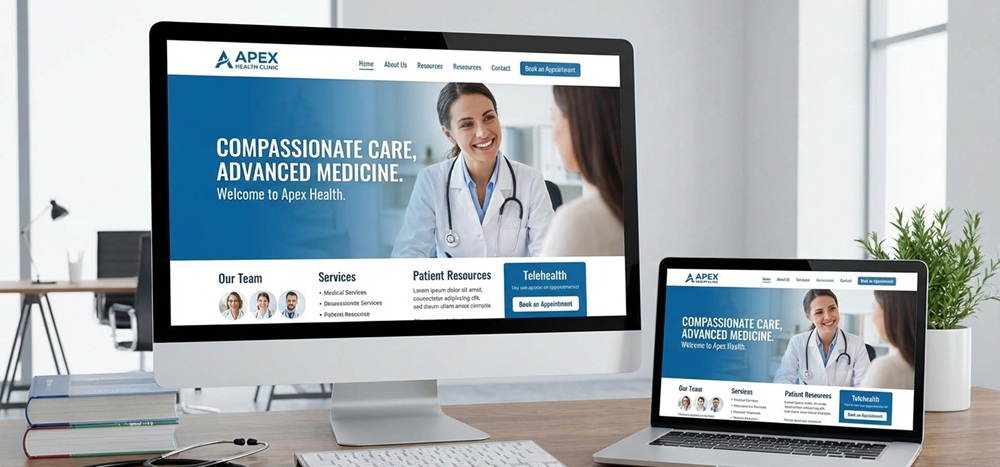
Looking for website design for doctors?
Don’t make the mistake of confining a doctor’s website functions to a mere online profile. Just as patients form impressions when they walk into a clinic, they now form opinions the moment they land on a doctor’s website.
Table of Contents
ToggleModern patients rarely choose a doctor without first searching online. They compare websites, read reviews, and evaluate how accessible and credible a practice appears before making an appointment. Explore how medical professionals can leverage website design to strengthen patient relationships and grow their practice.
Core Features of an Effective Doctor Website
An effective doctor’s website is a patient’s first impression of the care they receive. Over 83% of patients check a healthcare provider’s website before booking an appointment. It makes the design and functionality critical for trust, credibility, and accessibility.
Clear and Professional Homepage
A homepage acts as the digital front desk. Patients decide within 50 milliseconds whether a website looks credible. Key elements include –
- Clean design with professional imagery (avoid generic stock photos).
- Prominent display of the doctor’s name, specialty, and credentials.
- Quick links to services, appointments, and contact details.
Easy-to-Find Contact Information
Patients often visit a doctor’s website to find phone numbers, addresses, or email addresses. Best practices –
- Place contact info in the header and footer of every page.
- Include clickable phone numbers for mobile users.
- Add Google Maps integration for directions.
Online Appointment Booking System
In 2025, patients expect healthcare websites to function like consumer platforms. 60% of patients prefer booking online rather than calling. Features to include –
- Real-time scheduling synced with clinic calendars.
- Automated reminders via SMS/email.
- Secure patient data handling (HIPAA/GDPR compliance).
Service and Treatment Overview Pages
Patients want clarity about the services offered before committing. Best practices –
- Create dedicated pages for each treatment.
- Use plain language, avoiding medical jargon.
- Add FAQs and patient education resources.
Emergency Contact or Urgent Care Information
Patients need reassurance that urgent help is available. Implementation tips –
- Highlight emergency numbers prominently (“Call 999 in the UK” or “Call 911 in the US”).
- Provide urgent care clinic hours and directions.
- Add a “red button” or banner for emergencies.
Homepage Design for Medical Websites
Clear Value Proposition and Specialization Highlight
Patients want to know immediately what the doctor or clinic offers. A vague homepage risks losing visitors. Display specialization prominently (“Cardiology Expert with 15+ Years of Experience”).
Use concise, patient-focused language: “Helping families stay healthy with compassionate pediatric care”. Include visuals of doctors, facilities, or patient care to reinforce the message.
Trust Signals Above the Fold
Trust is the cornerstone of healthcare. Patients often decide whether to stay on a site based on visible credibility markers. Showcase credentials, certifications, and years of experience prominently.
Add patient testimonials or ratings near the top. Display affiliations with recognized medical boards or hospitals. Patients are more likely to book when they see credentials and reviews upfront.
Simple Navigation for First-Time Visitors
Confusing menus frustrate patients—38% of users leave a site if navigation is poor. Keep menus short (Home, Services, Doctors, Appointments, Contact).
Use icons or dropdowns for clarity. Ensure mobile responsiveness—over 70% of patients access healthcare sites via smartphones.
Prominent Call-to-Action (CTA)
Patients want quick access to booking or calling. A hidden CTA reduces conversions. Place “Book Appointment” or “Call Now” buttons above the fold.
Use contrasting colors to make CTAs stand out. Offer multiple options: online booking, phone, or live chat. Healthcare websites with visible CTAs see up to 30% higher appointment bookings.
Doctor Profile and About Page Design
Professional Biography and Qualifications
Patients want reassurance that their doctor is qualified and experienced. Write a concise yet detailed biography highlighting education, training, and career milestones.
Use patient-friendly language—avoid overly technical jargon. Include years of practice and notable achievements. Keep biographies up to date; outdated information reduces credibility.
Certifications, Licenses, and Affiliations
Displaying certifications and affiliations builds confidence. List medical board certifications, licenses, and memberships (American Medical Association).
Use logos of affiliated hospitals or institutions for visual impact. Ensure compliance with local regulations (e.g., HIPAA in the US and GDPR in Europe).
Areas of Expertise and Medical Philosophy
Patients want to know not just what a doctor does, but how they approach care. Highlight specialties (cardiology, pediatrics, dermatology).
Share treatment philosophy—whether it’s patient-centered care, preventive medicine, or holistic approaches. Use bullet points for clarity.
Humanizing the Doctor Through Photos and Personal Messaging
Patients connect better when they see the human side of their doctor. Use professional, high-quality photos (avoid stiff passport-style images).
Add personal touches such as hobbies, community involvement, or volunteer work. Include a short personal message or quote, like “I believe in treating every patient like family”.
Service and Treatment Page Structure
Dedicated Pages for Each Medical Service
Patients often search for specific treatments (“root canal treatment Galle” or “cardiology consultation London”). Having individual pages improves SEO and discoverability.
Create separate pages for each service (e.g., Pediatrics, Orthopedics, Dermatology). Use clear headings and structured layouts for easy scanning. Include service-specific CTAs, such as “Book a Dermatology Consultation.”
Clear Explanation of Conditions Treated and Procedures Offered
Patients want clarity before committing to a doctor. Ambiguity can discourage bookings. So, list common conditions treated (“We treat hypertension, diabetes, and thyroid disorders”).
Provide step-by-step explanations of procedures (“During cataract surgery, the cloudy lens is replaced with a clear artificial lens”). Use visuals like diagrams or short explainer videos.
Use of Patient-Friendly Language
Medical jargon can intimidate patients. Clear, empathetic language builds trust. Replace technical terms with simple explanations (“high blood pressure” instead of “hypertension”).
Use conversational tone: “We’re here to help you feel better, step by step.” Add FAQs to simplify complex topics. Readability increases patient engagement when medical content is simplified.
Addressing Common Patient Questions and Concerns
Patients often hesitate due to unanswered questions. Addressing them upfront reduces anxiety and increases conversions. Add FAQ sections: “Is the procedure painful?”, “How long is recovery?” “What are the risks?”
Include cost transparency where possible. Provide links to insurance information and payment options. Integrates FAQs and patient reviews directly into service listings, helping patients make informed decisions.
Appointment Booking and Patient Communication
Online Scheduling and Calendar Integration
Patients increasingly expect healthcare websites to function like consumer platforms. A survey by Accenture found that 68% of patients prefer booking appointments online rather than calling.
Integrate real-time calendars that sync with clinic schedules. Offer multiple time slots and instant confirmation. Ensure compatibility with mobile devices. Use color-coded calendars (green for available, red for booked) to simplify navigation.
Appointment Reminders and Confirmations
Missed appointments cost the healthcare industry billions annually. Automated reminders reduce no-shows by up to 30%. Send SMS/email reminders 24–48 hours before the appointment.\
Allow patients to confirm or reschedule with one click. Provide digital receipts or confirmation codes for reassurance. Personalize reminders with the doctor’s name and clinic details to build trust.
Contact Forms and Secure Messaging
Patients often have questions before booking. Secure communication channels improve satisfaction and compliance. Add simple contact forms with fields for name, email, phone, and inquiry.
Use HIPAA-compliant or GDPR-compliant secure messaging systems. Offer chatbots for quick FAQs, but ensure human follow-up for complex queries. Patients want secure messaging options before committing to a provider.
Reducing Friction in Patient Booking Journeys
Every extra step in booking increases drop-off rates. Patients expect simplicity. Minimize form fields—only ask for essential information.
Offer multiple booking options: online, phone, or WhatsApp integration (popular in South Asia). Provide clear CTAs like “Book Appointment Now” or “Call for Urgent Care”.
Designing for Elderly and Disabled Users
Elderly patients often struggle with small fonts, complex navigation, or cluttered layouts. Disabled users may rely on assistive technologies like screen readers or voice commands.
Use large, legible fonts and avoid overly decorative typefaces. Provide clear instructions for booking appointments or accessing services. Offer adjustable text size and contrast settings.
Readable Fonts, Color Contrast, and Simple Layouts
Poor readability is a significant barrier—38% of users leave websites if the content is hard to read. Use sans-serif fonts (Arial, Verdana) for clarity.
Maintain a minimum contrast ratio of 4.5:1 between text and background (WCAG 2.1 standards). Keep layouts simple—avoid clutter, excessive pop-ups, or complex menus.
Screen Reader Compatibility and Keyboard Navigation
Patients with visual impairments rely on screen readers, while those with motor disabilities often use keyboard navigation. Add alt text for all images and icons.
Ensure headings follow logical hierarchy (H1, H2, H3). Enable full keyboard navigation (tabbing through menus, forms, and CTAs). Inclusive digital spaces build trust and empower patients to advocate for themselves.
Ethical and Legal Importance of Accessibility in Healthcare
Healthcare is a fundamental right. Excluding patients through inaccessible design undermines equity and trust. In the US, healthcare websites must comply with the Americans with Disabilities Act (ADA) and Section 504 of the Rehabilitation Act.
In Europe, the EN 301 549 standard mandates accessibility for public sector websites. Formal digital accessibility laws are still evolving in many regions, and hospitals that adopt inclusive design gain a reputational advantage and patient trust.
A properly structured and well-functioning doctor’s website opens the gateway to patient trust, accessibility, and long-term relationships. Every element plays a vital role in shaping how patients perceive care before they ever step into the clinic. Patients are searching online, comparing options, and making decisions based on what they see. A thoughtfully designed website ensures that your practice stands out not only for its medical expertise but also for its credibility, compassion, and convenience.
Contact Tectera a website development company in Toronto for website design for doctors.
Frequently Asked Questions
A homepage should highlight the doctor’s specialization, credentials, services, and a clear call to action (Book Appointment/Call Now). It must be simple, mobile-friendly, and patient-focused.
Trust is built through professional design, visible credentials, patient testimonials, secure HTTPS protocols, and precise contact details. Studies show patients decide within 0.05 seconds whether a site looks credible.
Yes. Dedicated service pages improve SEO and patient clarity. Each page should explain conditions treated, procedures offered, and FAQs in patient-friendly language.
Through a Doctor Profile/About Page featuring biography, certifications, affiliations, areas of expertise, and a personal message. Adding professional photos humanizes the doctor.
Yes. Testimonials act as social proof, increasing trust and conversions. Video testimonials or Google review integrations further enhance credibility.

